Last Updated: February 05 2026
Simpro Premium 26.1.2
What's new in Simpro Premium: from 25 January 2026 AEST
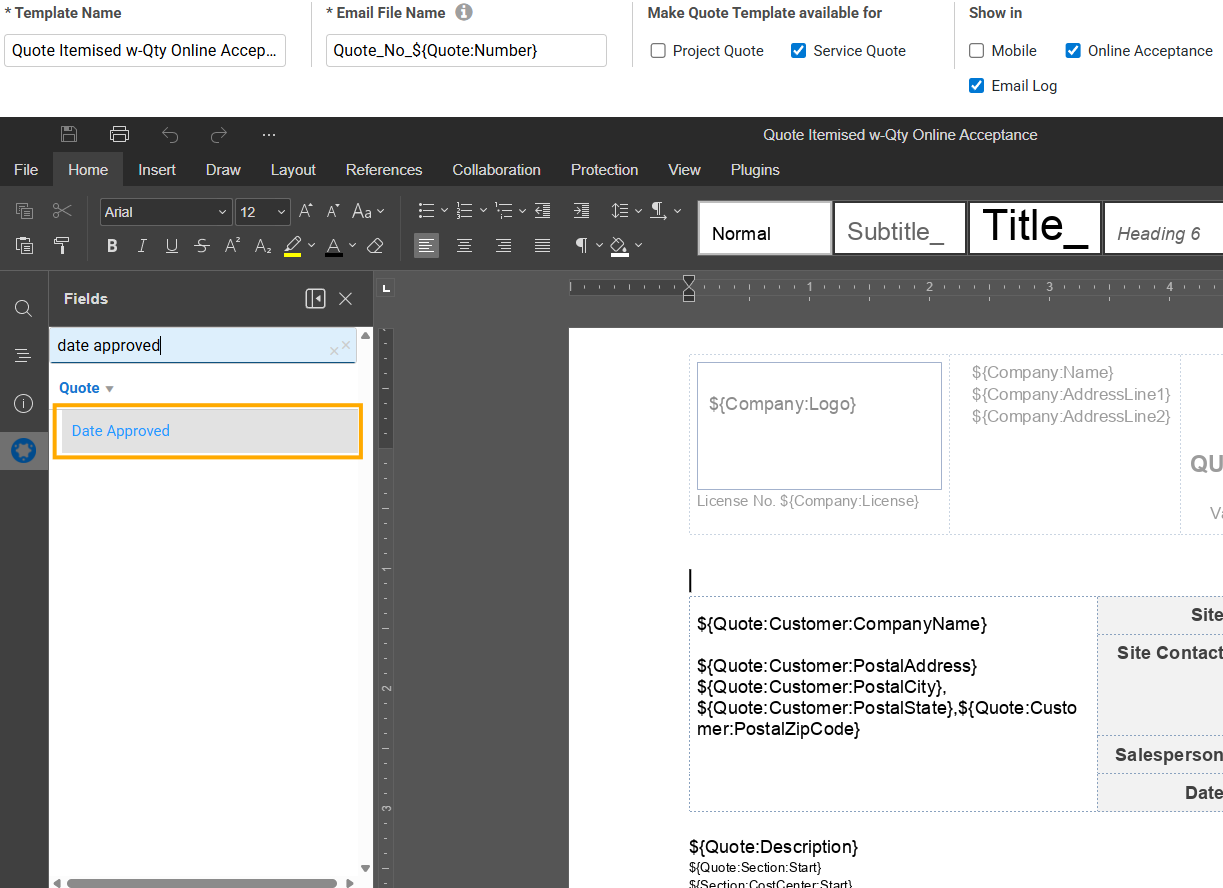
Additional Quote Form Builder Field - Date Approved
Provide even more details on your quote forms by selecting the Date Approved plugin field in Quote Form Builder Templates to display the relevant information on your forms.
|
Get a sneak peek |
|---|
|
|
| Read the Help Guide |
|---|
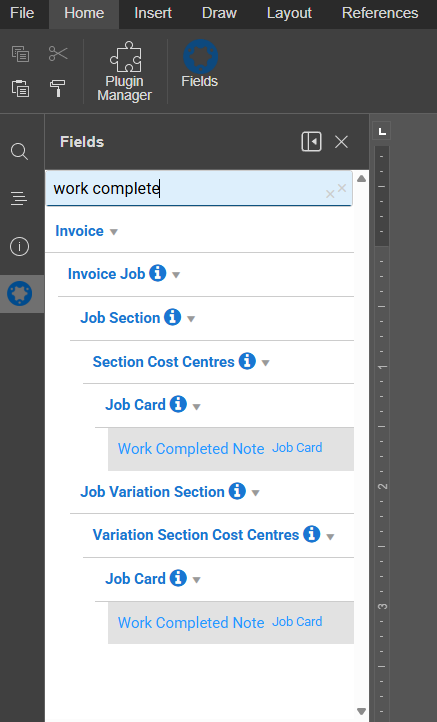
Additional Invoice Form Builder Field - Work Completed Note
Provide even more details on your invoice forms by selecting the Work Complete Note plugin field in Invoice Form Builder Templates to display the relevant information on your forms.
|
Get a sneak peek |
|---|
|
|
| Read the Help Guide |
|---|
Security Groups: Improved viewing options for Sites, Suppliers and Customer Assets
Have more control over your security groups, including new options for viewing sites, suppliers and customer assets details.
There are also new permissions for merging sites and suppliers.
New Simpro Payments Page
The Simpro Payments page has been moved from the Invoices menu to a separate Simpro Payments menu. Access all of the same information in one convenient place.
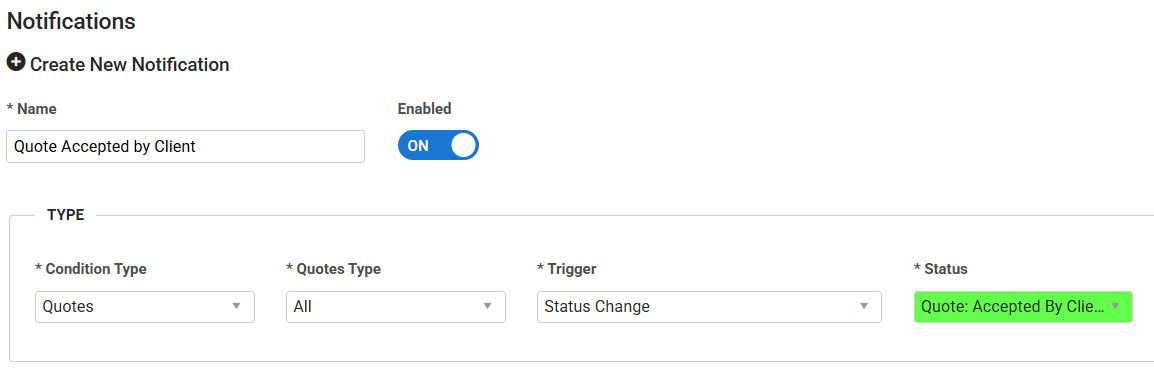
Consolidated service and project notifications
When setting up notifications for jobs and quotes, you can use a single notification for both service and project type jobs and quotes, instead of setting up individual notifications for service quotes and jobs and project quotes and jobs.
To create a notification, go to System > Setup > Notifications > Create Notification. Select Jobs/Quotes as the Condition Type and you then have the option to select All as the Jobs/Quotes Type.
|
Get a sneak peek |
|---|
|
|
| Read the Help Guide |
|---|
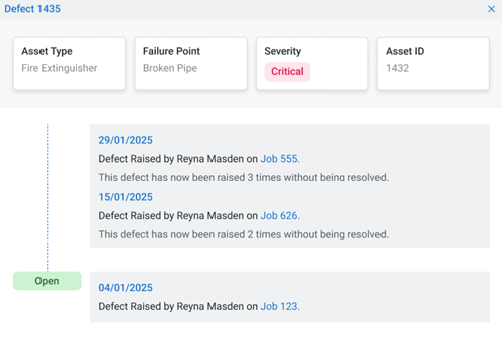
Duplicate Defects (Maintenance Planner)
When viewing and managing defects in the Defect Management tab, you are now able to more accurately see an updated historical timeline of a defect if it has been raised multiple times, instead of duplicating the defect which may cause confusion.
|
Get a sneak peek |
|---|
|
|
| Read the Help Guide |
|---|
Enhancements
- We’ve added the Romanian Leu as a new currency. Go to System > Setup > Currencies to use this currency in transactions.
- Previously, when overlapping schedules were created in Schedules > Day/Week view, the relevant schedules would display in the same block with the white/red alert block. Now, these schedules display separately while still showing the white/red alert block, providing better clarification and easier editing.
Improvements
- Previously, the Sales Invoices report was showing the incorrect retention amount for an invoice. Now this has been fixed.
- In the Customer Portal, printing a job form was causing the job table view to change configuration. All fixed!
- If your technicians had critical licences that expired, they were still showing up as preferred technicians in customers and sites. Now technicians with expired licences will be hidden.
- In the Customer Portal, if a customer had multiple tasks with no assigned site, if they added a site to one task that site was being added to all the tasks. Now only sites that have been assigned will show up on tasks.
- Sometimes you weren’t able to approve a stock take. All fixed!
- Previously, when importing site contacts from Utilities > Imports > Sites, updated contact details could be missed even if the process completed successfully. It has been fixed.
- Deleted contacts were still shown under the site profile. This has been fixed.
- Previously, when sending an email, if the Cc field contained an invalid email address, the email would only be sent to the main recipient and not to any Cc’d addresses, even if the other addresses were valid. Now all fixed.
- In the task list, after using the advanced filter to select a status and search, the total number of results was reduced when clicking the All icon at the bottom of the page. Now it has been fixed.
- When scheduling employees from Schedules > Project View, the created schedule blocks were misaligned with the background table. All fixed!
- When you tried exporting a payment with a late fee to QBO, the late fee wasn’t being exported. All fixed.
- The job invoice total was showing an incorrect amount compared to the price in the job details. It has been fixed.
- In the employees list, clicking the Teams field would sort the employee list alphabetically instead of by team names. Now it has been fixed.
- UK only: Quote PDF forms were not displaying the Domestic Reverse Charge in the summary section when the company’s settings matched the preconditions. All fixed!
- When an automated recurring invoice was created and emailed to the customer, it included only the invoice but not the other email attachments. Now it has been fixed.
- If you archived a work order after the job has been invoiced, the Profit Loss and Job report was incorrectly including costs from the work order. Now your profit and loss will be accurate.
- Renaming an optional cost centre on a quote was causing the options menu to disappear for all cost centres on the page. All fixed!
- When you credited a receipt assigned to a job, this wasn’t recorded in the job log. Now your credited receipts will be logged.
- Sometimes you weren’t able to drag image attachments from Simpro to another location. Now your attachments can be easily moved.
- If you use the Taxify integration, the tax rate from Taxify was not correct. Now the tax rate will be right.
- In the Manual Schedule View, when you received the Unsaved Changes pop-up, you weren’t able to click No and close the pop-up. All fixed!
- Scheduled reports were printing unexpected characters in the PDF. Now your PDFs will look normal.
Learning Toolbox
Get up to speed by completing a quick learning material in Simpro's Learning Toolbox.